

There are several Payment gateways that you can use on your online shop but Yoco is a great option! They make it pretty easy and straightforward to signup, and setup your account. If you want to use Yoco as your payment gateway for accepting credit cards on your website, follow the steps below to activate your account and get the info that we need to connect your website to your Yoco account
Step 1: Sign up with Yoco
To receive payments with Yoco, you need a Yoco profile.
Step 2: Find and sent us your Yoco info:
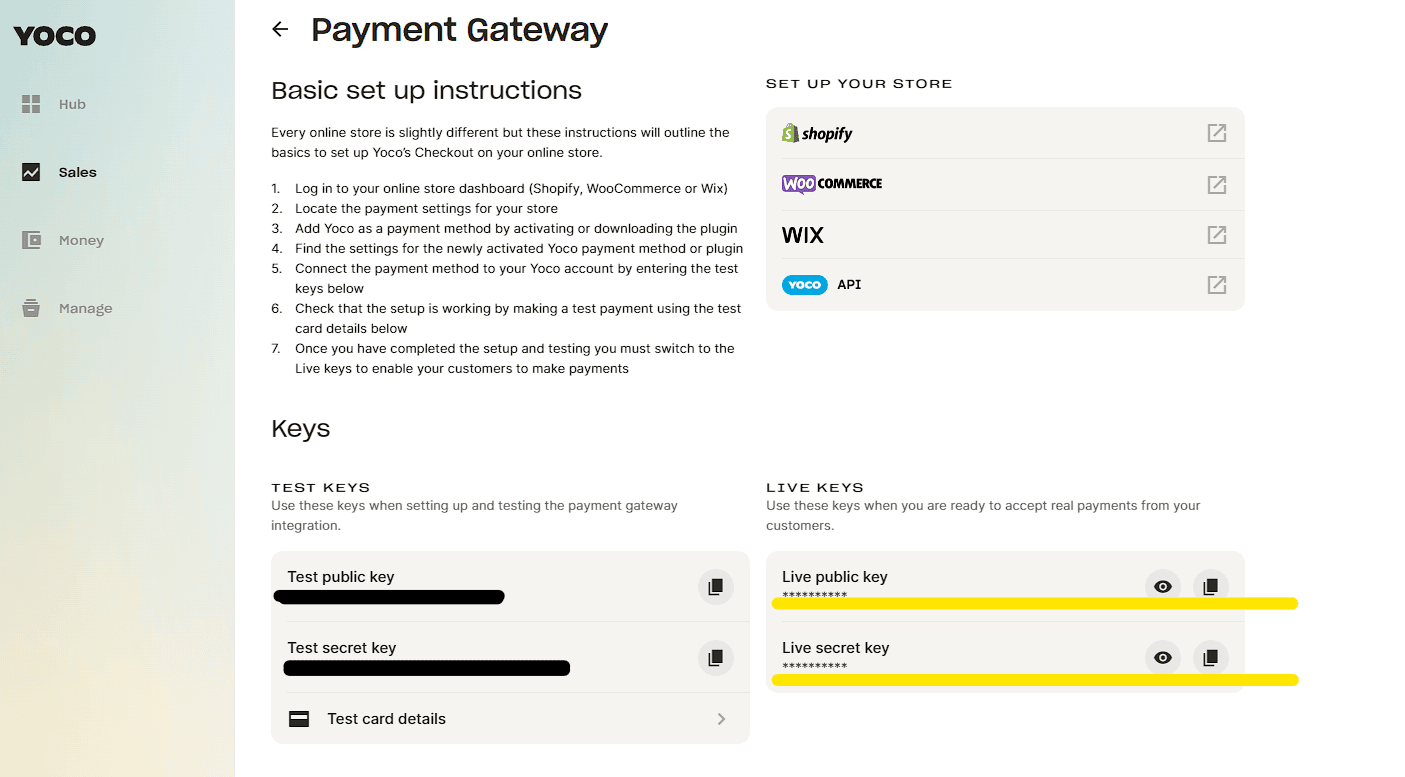
a) In your Yoco Dashboard, go to ‘Sell Online > Payment Gateway’.
b) Copy the Live API keys or the Test API keys. Use the Test API keys to test if payments work with a test card. The Live API keys are for real transactions.
c) Email us the copied keys. We\’ll then connect the website to your Yoco account with these keys.

When customer transactions are successfully completed, you and your customers will each receive payment confirmation emails. All payments information can be viewed on your Yoco Portal under Sales and Refunds > History.
For more information on how Yoco and this process works, please click here.